
Expeditions quick guide
Expeditions shows your AI agent's work as a small pixel-art battle in a window on your computer. Your agent fights by working, so you have nothing to press while it runs. When the task is done, you say how it went and collect the rewards.
The pictures come from made-up example sessions. The gold numbers point at the parts explained under each picture.
Set it up once
Install the plugin. In Claude Code, run these two commands. The steps for Codex, OMP and Gemini CLI are on the Expeditions page. You need Node 22 or newer.
/plugin marketplace add Demonbane18/vibe-rpg-plugin/plugin install expeditions@viberpgStart a new session and ask your agent to “start my expedition”. The window opens in your browser. It runs on your own computer, not on this website. From then on, your first session each day opens it by itself, and you can ask your agent to “open the expedition window” whenever you closed it.
Work the way you always do. The battle follows along, and the rest of this guide shows what you'll see.
What you see
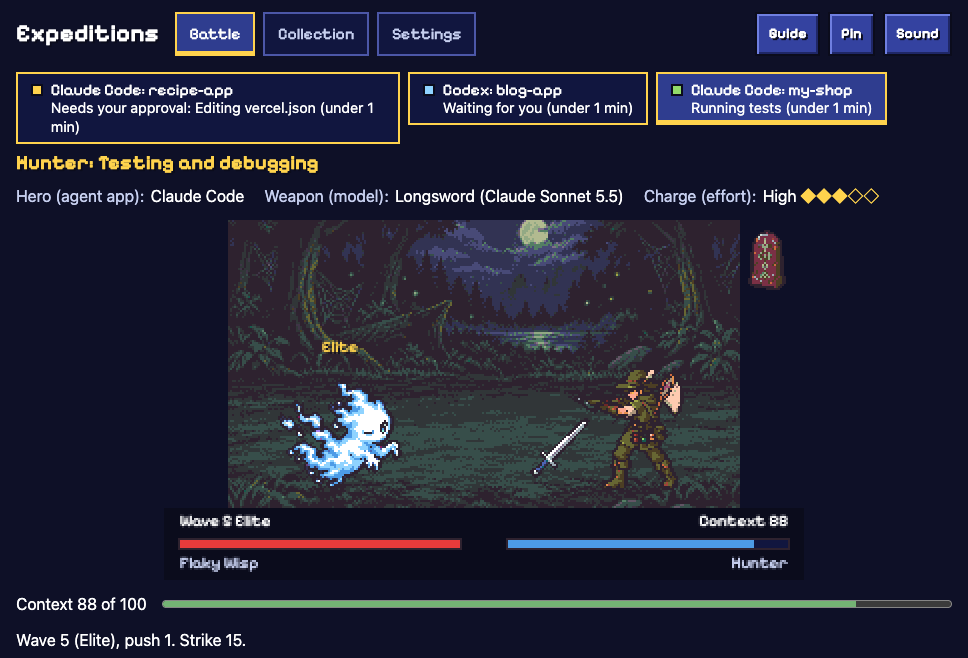
- The island lists every agent session that's open right now. The ones that need you come first.
- The Class, the kind of task your first prompt asked for. Here it's Hunter: testing and debugging. If it guessed wrong, open Change class under the battle.
- Your Hero (agent app), Weapon (model) and Charge (reasoning effort).
- The Foe stands for the problem this class fights. A Flaky Wisp is a failing or flaky test, and every fifth wave brings a tougher Elite.
- Your party. It strikes each time your agent finishes an action.
- A Scroll (skill) your agent opened. The spells it uses appear beside the battle.
- Context is the party's health bar. Foes wear it down, and every finished turn gives 10 back.
- Wave, Push and Strike: how far the party has come, which attempt this is and how hard each action hits.
- Guide opens this page. Pin keeps the island and the battle on top of your other windows.
The island
Each chip is one agent session: the agent, the project folder and what it's doing. The time in brackets is how long it has been doing that.
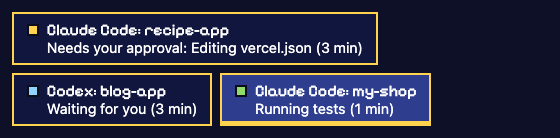
- Gold means it needs your approval. Here the agent wants to edit vercel.json. Answer in your agent; the island only shows that it's waiting.
- Blue means it's waiting for you. The agent finished its turn and is ready for your next message.
- Green means it's working. Here my-shop is running its tests.
Click a chip to watch that session's battle. When a session starts waiting for you, a short chime plays and the tab title counts the sessions that need you, such as “(2) Expeditions”. The chime needs one click anywhere in the window first, and you can turn it off in Settings.
An example session
Here is the session from the pictures, step by step.
| In your agent | In the window |
|---|---|
| You type: “The checkout test fails sometimes. Find out why and fix it.” | Expeditions picks Hunter (testing and debugging). It reads your prompt on your computer, then drops the text. |
| The agent opens the systematic-debugging skill. | The Scroll (skill) joins the party. Trials found it helps on Hunter quests, so it's Buffed here and Strike goes from 10 to 15. |
| It reads files and searches the code. | Each finished action strikes the foe. |
| A test run fails. | A miss: no damage and nothing lost. Failing tests are part of good work. |
| The next action works. | Rally: that strike hits 5 harder. |
| The party reaches wave 5. | An Elite, a tougher foe. This Flaky Wisp dodges every other strike, like a flaky test that passes one run and fails the next. Beating it brings a choice. |
| The agent finishes its reply. | The turn's last strike lands, Context goes up by 10 and “How did it go?” appears. |
| You end the session and press Cleared. | A finale plays and the rewards go to your guild hall. |
The choice every fifth wave

- Sharpen: +3 strike for the rest of this push.
- Rest: +20 Context.
- You don't have to answer. If you haven't picked when the turn ends, your Stance picks: Steady takes Rest, Press on takes Sharpen. You can change it in Settings.
Choices stop after 3 Sharpens and past wave 20.
Copy what trials found
Under the battle, a card shows what the Proving Grounds measured for your class.
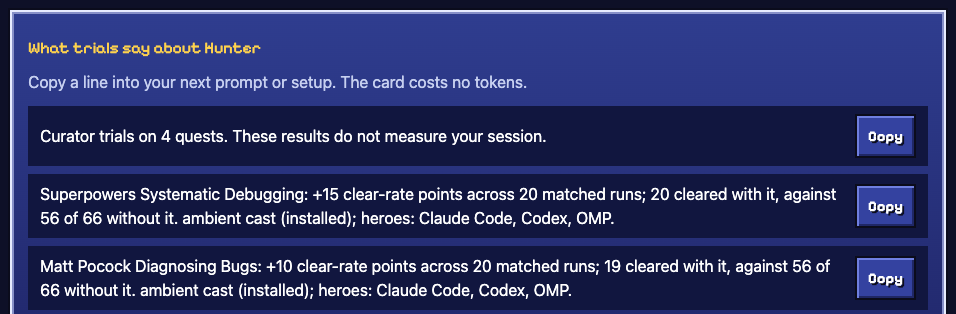
- Open the card to see the curator's trial results for this class.
- A spell that raised the clear rate in those trials, with the numbers behind it. Trials don't measure your own session.
- Copy puts the line on your clipboard, ready for your next prompt or setup. The card costs no tokens.
Classes without trials say “not measured yet” and list their spells without claims.
When you're done

- Cleared
- The task worked. The finale plays and you can earn stars.
- Partly
- Some of it worked.
- Fizzled
- It didn't work. You lose nothing.
- Skip
- You'd rather not say.
Answer whenever you like. Once your agent's session ends, Expeditions waits about 15 minutes for an answer, then settles without one. Stars and badges need Cleared. Trophies, records and spell levels count whatever you answer.
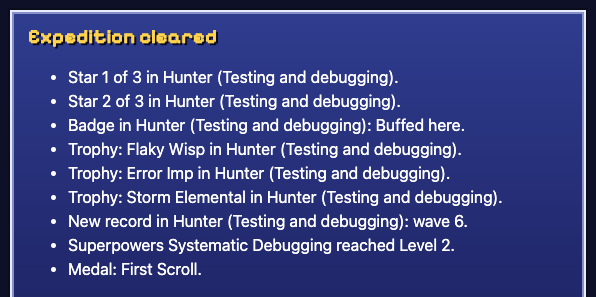
- Stars, up to three per class: one for Cleared, one for using one of the class's spells (or none at all where trials favour Wise Restraint) and one for a Combo, spells used in order.
- A badge: Buffed here, for clearing with a spell that trials found helpful in this class.
- A Trophy for each foe beaten in this class for the first time.
- A record: the deepest wave you've reached in this class.
- Spells your agent uses are Caught and level up across sessions; levels are only for show. Medals mark milestones such as First Scroll.
Your guild hall
The Collection tab keeps your progress across sessions, on your computer only.
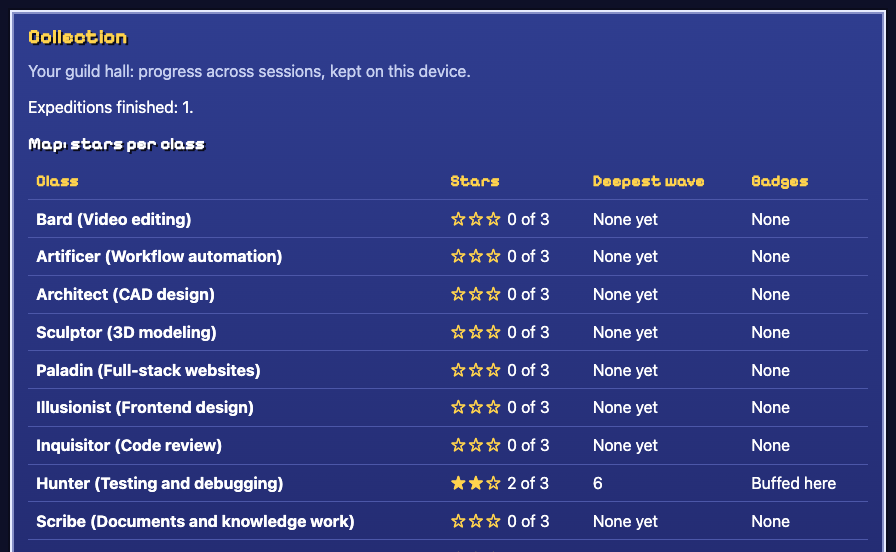
- The map has a row for each class.
- Stars earned in that class, out of 3.
- The deepest wave reached there.
- Badges earned there.
Below the map are your Trophies, Caught spells and medals. The export link sends Caught spells and medals to the Practice Grounds Spelldex.
Good to know
- The battle costs no tokens. The hooks only watch what your agent does, and the game runs on your computer. Asking your agent to open the window is an ordinary request. Guide mode, off unless you turn it on, adds one short note to a session's first prompt in Claude Code and Codex.
- Nothing rewards keeping an agent busy. Idle time earns nothing, failures cost nothing and waves past 20 pay nothing extra.
- When the party falls, it rests at Camp. Your next prompt starts a new push from wave 1, and the session still earns its rewards once.
- Your prompt is read on your computer to pick the class, then dropped. Folder and file names on the island stay in memory and are never saved or uploaded.
- For an agent Expeditions can't follow, use Play by hand under the battle: pick the class, press Progress when a step lands and End when you're done.
Every game word and its plain meaning is listed on the Expeditions page.